Loop Engineering: The Practice Layer Above Prompting
June 26, 2026 | Sources: Addy Osmani, O'Reilly Radar, Karpathy Sequoia Ascent 2026
New discipline: Multiple practitioners independently converge on the same architecture for AI coding agents; Osmani formalizes it as a five-component framework.
Addy Osmani, engineering lead on Chrome at Google, published a piece in early June giving this practice a name: loop engineering. O'Reilly Radar republished it on June 22. The piece centers on two quotes from practitioners who already work this way. Boris Cherny, who leads Claude Code at Anthropic, says he does not prompt Claude anymore. He has loops running that prompt Claude for him. His job is to write the loops. Peter Steinberger, prolific open-source developer and early Claude Code power user, puts it similarly: you should not be prompting coding agents. You should be designing loops that prompt your agents.
The idea is straightforward. You open your terminal, type a prompt, wait for output, evaluate it, prompt again. You are the trigger, the verifier, and the state manager. Loop engineering removes you from that cycle and replaces each role with infrastructure.
Andrej Karpathy's Sequoia Ascent talk explains why this works specifically for code. Traditional software automates what you can specify. LLMs automate what you can verify. Code gives you automatic verification: tests pass, types check, programs compile. So you build the verification environment, point an agent at it, and let it run in a loop until the checks pass.
The five components
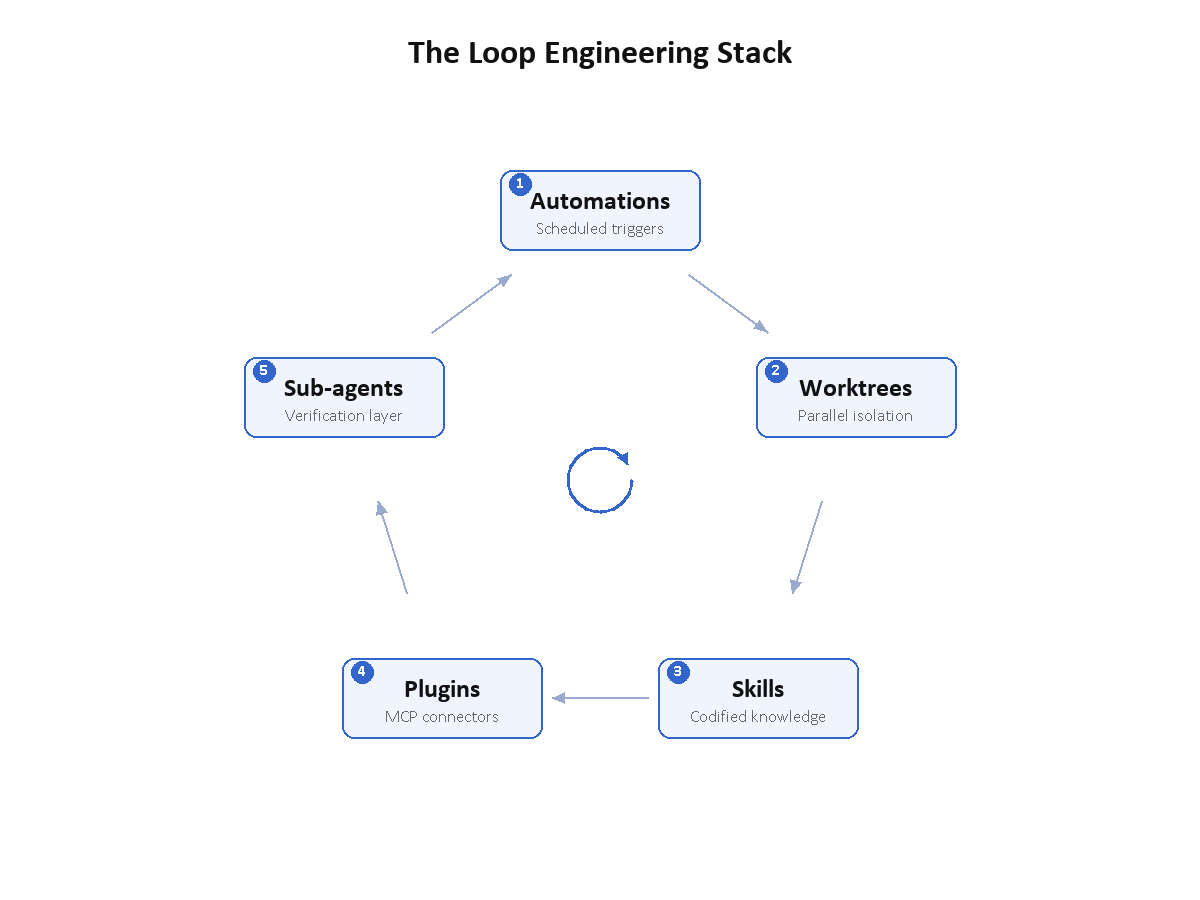
Osmani breaks production loops into five parts.
Automations. Something triggers the loop without a human. A cron job, a webhook, a file watcher. If you have to open a terminal and type a command, the loop is not autonomous yet.
Worktrees. Isolated parallel workspaces so multiple agents can work on the same codebase without file collisions. Git worktrees give each agent its own copy of the repo.
Skills. Codified project knowledge in files like CLAUDE.md so agents do not re-learn project conventions on every invocation.
Plugins and connectors. MCP-based integrations that give agents access to external tools: issue trackers, databases, deployment systems. The agent can only act on what it can reach.
Sub-agents. Separate verification agents that review the output of generation agents. Never let the author grade its own work.
I built a system called mstack that implements all five. I type one sentence describing a feature. The system decomposes it into ordered plans, validates each plan, then runs autonomously: pick a plan, implement it, run the health check, commit, extract learnings, pick the next plan. I come back to a commit history. The automation triggers on my commit. Each task runs in its own worktree. Skill files encode project conventions. MCP servers connect to my test infrastructure. A review agent validates the output before the commit lands.
I think before and review after. The loop handles the middle.
Why This Matters for Developers
Individual prompt quality matters less when the loop runs fifty iterations with automatic verification. The skill that matters now is designing the loop: what triggers it, what verifies it, when it escalates to a human, how it handles failure.
Most teams already have pieces of this. CLAUDE.md files are skills. MCP servers are plugins. Some teams use git worktrees for parallel agent work. What most teams do not have is automations, sub-agent verification, or persistent state that outlives a session. Those are the components that close the loop.
Osmani warns about a cost. Loops ship code you never read. Every iteration that passes verification without human review grows the gap between what the codebase contains and what you actually understand. If you run the loop for a week without reading its output, you own a system you did not write and cannot explain. You have to break the loop deliberately and read the code, or that gap compounds.
Audit your AI workflows against the five components. For each one, which are present and which are missing? Start with sub-agent verification. That is the one most teams skip, and it is the one that prevents the loop from shipping broken code without anyone noticing.